Indicators in the Playback Status Display
This section identifies the color and text conventions used to indicate various playback conditions in the Playback Status Display (PSD) [Tab 2].
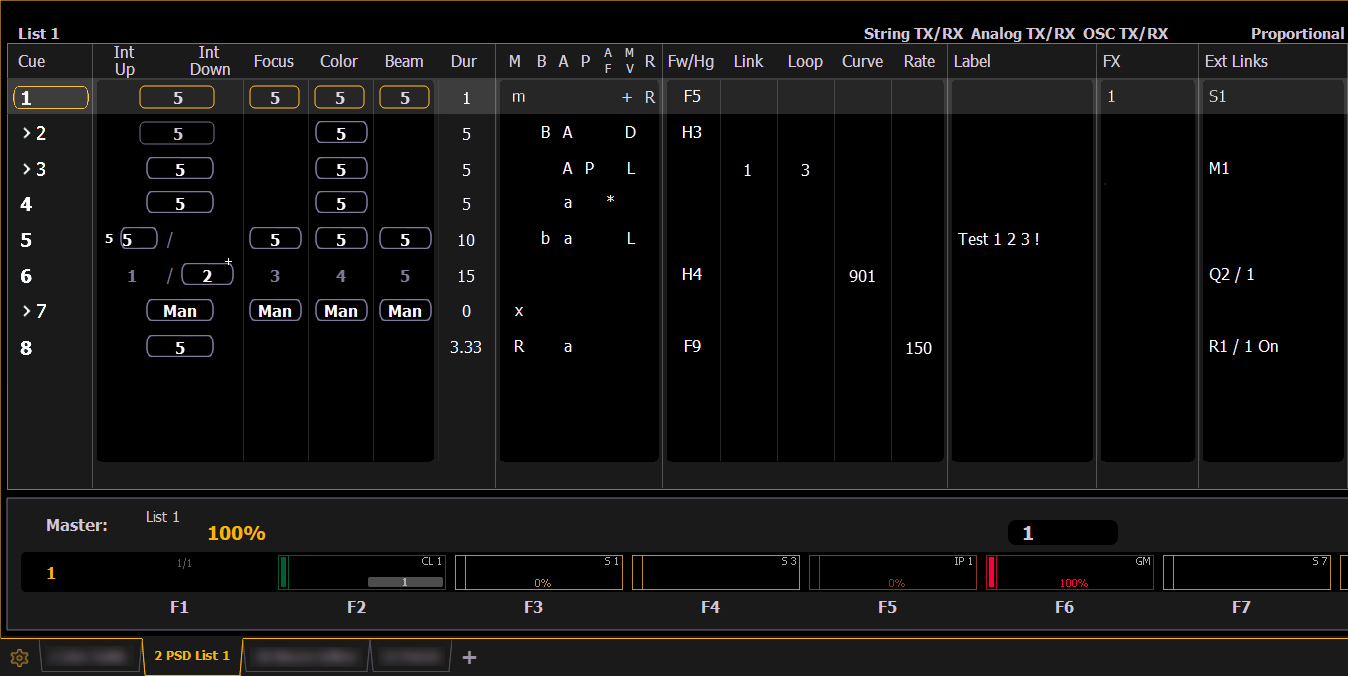
The Playback Status Display will show a red counter for sneak time.
Any show control options that are currently enabled in Setup > System > Show Control will display at the top of the Playback Status Display.
Color Indicators
Cue List
- Gold - Any item (cue, list, page) highlighted in gold indicates “current”.Outlined in gold indicates “selected”.
- Red - Cue fade is in progress
Fader Ribbon / Display
Note: This option is not available on Element 2 and Element Classic.
- Red - Grandmasters and inhibitive submasters
- Yellow - Additive submasters
- Green - Playback faders
- Orange - Presets and palettes
Text Indicators
- + (see cue 6) - Indicates that there is discrete timing within the associated cue. Found in the cue display “Timing” area.
- * (see cue 4) - Indicates the cue has an allfade command. Found in the cue display “Flags” area.
- * - Indicates a link to a non-existent cue. Found in the cue display "Link" area.
- D - Indicates a dark move, a cue that has any non-intensity parameters moving on channels whose intensity is at 0. Found in the cue display “Flags” area in the move column.
- x - Indicates that a mark has been placed, but the mark is broken.
- A or a (see cues 3 & 4) - Indicates an asserted cue. “A” indicates the entire cue is asserted. “a” indicates a channel or parameter assert only. Found in the cue display “Flags” area.
- B or b (see cues 2 & 5) - Indicates a blocked cue. “B” indicates the entire cue is blocked. “b” indicates a channel/ parameter block only. Found in the cue display “Flags” area.
- F1 - F10 - Indicate faders numbered 1 through 10 on the console. Found at the bottom of the fader display.
- > - Indicates a cue that will not require a Go, as the previous cue has a follow or hang time applied. Found to the left of the cue number.
- F5 (see in cue 1) - Indicates a follow time associated with the cue (in this case, 9 seconds). Found in the cue display.
- H3 (see cue 2) - Indicates a hang time associated with the cue (in this case 4 seconds). Found in the cue display.
- I - Indicates an intensity blocked cue. Found in the cue display “Flags” area.
- L - Indicates a live move. A “+” is used to show that both types of moves are in that cue.
- M or m (see cue 1) - indicates a cue with a Mark, or marked cue. “M” indicates an AutoMark or Referenced Marks used by a subsequent cue. “m” indicates a reference mark that is currently unused by any subsequent cue. Found in the “Flags” area.
- P (see cue 3) - Indicates the cue will preheat. Found in the cue display “Flags” area.
- R (see cue 8) - Indicates the source cue which refers back to an earlier mark. Found in the cue display “Flags” area.
- Number in the FX column (see in cue 1) - Indicates a cue level effects override.
- M1(see in cue 3) - Indicates a linked macro.
- Q2/1 (see in cue 6) - Indicates a linked cue.
- S1 (see in cue 1) - Indicates a linked string. The string will display here.
- Relay 1/1 (see in cue 8) - Indicates a linked relay.
Element Classic Text Indicators
- * - Indicates a link to a non-existent cue. Found in the cue display "Link" area.
- + (see cue 6) - Indicates that there is discrete timing within the associated cue. Found in the cue display “Timing” area.
- B or b (see cues 2 & 5) - Indicates a blocked cue. “B” indicates the entire cue is blocked. “b” indicates a channel/parameter block only. Found in the cue display “Flags” area.
- F5 (see in cue 1) - Indicates a follow time associated with the cue (in this case, 9 seconds). Found in the cue display. Notice the arrow on Cue 2.
- H3 (see cue 2) - Indicates a hang time associated with the cue (in this case 4 seconds). Found in the cue display. Notice the arrow on Cue 3.
- M (see cue 7) - Indicates a marked cue. “M” indicates an AutoMark.
- L - Indicates a live move. A "D" in the Move column would indicate a dark move. A “+” is used to show that both types of moves are in that cue.
- P (see cue 3) - Indicates the cue will preheat. Found in the cue display “Flags” area.
- Number in the FX column - Indicates a cue level effects override.
- M1 (see in cue 3) - Indicates a linked macro.
- S1 (see in cue 1) - Indicates a linked string. The string will display here.
- Relay 1/1 (see in cue 8) - Indicates a linked relay.